
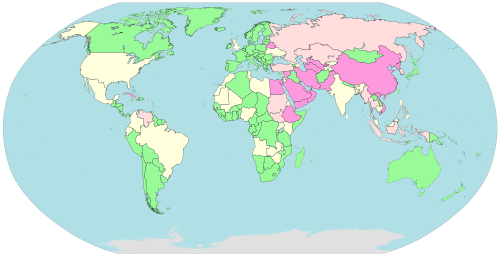
Internet censorship and surveillance levels vary widely by country. Source: Wikimedia Commons.
You click a link to a news story. Instead of the article, you get an error page, an endless spinner, or a notice saying the site “is not available in your region.” It happens more than people realize — and it’s not always your internet connection’s fault.
Governments, firewalls, and licensing rules block news sites for a surprising number of reasons: censorship, workplace and school restrictions, licensing that locks content to one country, or a media company deciding your region simply isn’t worth serving. Whatever the cause, a VPN is the most reliable way around it. Here’s how it works and which VPN actually gets the job done.
Why Are News Sites Blocked in the First Place?
Not every block has the same cause. Understanding why a site is unreachable helps explain why a VPN fixes it.
Government censorship. Some countries block foreign or independent news outlets outright, restricting citizens to state-approved sources. This is the most well-known reason, but it’s far from the only one.
Geographic licensing. Many broadcasters only hold the rights to show their content in one country. A news network might block anyone outside that country automatically, regardless of whether you’re a subscriber or a citizen abroad.
Workplace and school networks. Employers and schools often block news sites to limit distractions or manage bandwidth, using the same firewall tools that block social media or streaming.
Server-side geo-blocks. Some sites block entire regions after detecting unusual traffic patterns, ad fraud, or simply because it’s cheaper than serving content everywhere.
How a VPN Unblocks News Sites
A VPN (Virtual Private Network) routes your internet connection through a server in a different location. Instead of the news site seeing your real location, it sees the VPN server’s location instead.
If your country blocks a site, connecting to a VPN server in the right country solves the problem immediately. If a workplace firewall blocks a site, a VPN encrypts your traffic so the firewall can’t identify and filter it in the first place.
Not every VPN handles this well, though. Free VPNs and low-quality providers often use server IP ranges that are already flagged and blocked by major sites. A reliable paid VPN actively maintains and rotates its server IPs specifically to stay ahead of these blocks.
Best VPN for Accessing Blocked News Sites: NordVPN
NordVPN is our top pick for this specifically. It maintains one of the largest, most actively-managed server networks in the industry, which matters more than almost anything else when you’re trying to get past blocks that update frequently.
- Servers in 60+ countries, so you can match whichever region a site restricts access to
- Fast enough speeds for video and live streaming, not just text
- Strong encryption, so workplace or school firewalls can’t identify and block the traffic
- No data caps or bandwidth limits
- 30-day money-back guarantee
Other Solid Options
NordVPN isn’t the only VPN worth considering, depending on your priorities.
CyberGhost labels its servers by what they’re optimized for, which makes it easy to find the right connection for a specific news site without guessing. It’s a good pick if you want a simpler, more guided setup.
Surfshark covers unlimited devices on a single plan at a lower price, which is useful if you need this working across a phone, laptop, and a family member’s devices too.
Get CyberGhost\nGet Surfshark\n
For the full breakdown of pricing and features across six providers, see our complete VPN comparison guide or browse our full VPN provider directory.
How to Set Up a VPN to Access a Blocked News Site
- Sign up for a VPN with strong server coverage, like NordVPN
- Install the app on your phone, laptop, or whichever device you use to read the news
- Open the app and connect to a server in the country where the site is normally accessible
- Reload the news site or app
- If it’s still blocked, try a different server in the same country — individual server IPs occasionally get flagged, but the provider rotates them regularly
Most connections take under a minute. If you’re trying to reach a site with tighter restrictions, it can occasionally take switching servers once or twice before you get through.
Is It Legal to Use a VPN for This?
In most countries, using a VPN is completely legal, including for accessing news sites. A handful of countries restrict or ban VPN use entirely, so it’s worth checking local law if you’re somewhere with strict internet controls. This isn’t legal advice — if you’re in a country with serious restrictions on press access, understand the risks in your specific situation before relying on a VPN.
For everyday cases — getting past a workplace firewall, reading a paper’s coverage while traveling, or reaching a broadcaster that geo-blocks your country — a VPN is a standard, unremarkable tool used by millions of people daily.
Free VPN vs. Paid VPN for News Access
Free VPNs are tempting, but they tend to fail at exactly this task. Streaming sites quickly block their small server pools, and slow speeds make video content painful to load. Worse, several free VPN providers have been caught logging or selling user data — the opposite of what you want when the reason you’re using a VPN is privacy in the first place.
A paid VPN in the $2–4/month range solves both problems: larger server pools that stay ahead of blocks, and a business model that doesn’t depend on selling your data.
Common Situations Where This Comes Up
This isn’t just a theoretical problem. A few everyday situations account for most of the searches that bring people to this page.
Living abroad and missing hometown coverage. Expats often find that their local news station locks its live stream or on-demand video to their home country, even though they’re a citizen who used to watch it every day.
Traveling for work or vacation. A short trip shouldn’t mean losing access to your regular news sources. Hotel wifi and foreign networks sometimes trigger the same regional blocks as a permanent move.
Studying or working on a restricted network. Campus and corporate IT departments block broad categories of sites, and news outlets frequently get caught in filters meant for something else entirely, like social media or streaming.
Researching international coverage. Journalists, students, and researchers often need to read how another country’s outlets are covering a story — something that’s impossible if that country’s outlets are geo-restricted.
Avoiding a single point of failure. Relying on only the news sources available in your region means missing context, other perspectives, or breaking coverage that a foreign outlet reported first.
Desktop, Mobile, and Smart TV: Getting Set Up Everywhere
Most people don’t read the news on just one device, so it’s worth checking that whichever VPN you choose covers all of them.
On a laptop or desktop, the VPN app runs in the background and protects everything in your browser automatically — no per-site configuration needed. On mobile, the same applies through the VPN’s phone app, which is useful if you check the news primarily through a news app rather than a browser.
If you tend to watch news broadcasts on a smart TV or streaming box, check that your VPN offers an app for that platform directly, or supports setting up the VPN at the router level so the VPN covers every device on your home network at once. NordVPN and CyberGhost both support this for most major smart TV platforms.
What to Look for in a VPN for This Purpose
Not every feature a VPN advertises matters equally here. When you’re specifically trying to reach blocked news content, a few things matter more than the rest.
Server count and spread. A provider with servers in dozens of countries gives you more options if one region’s connection trips a flag. A VPN with only a handful of locations runs out of alternatives quickly.
Speed for video, not just browsing. Text loads fine on almost any VPN. Live news broadcasts and video clips are where slow or overcrowded servers show their limits, so prioritize a provider known for consistent streaming speeds.
No-logs policy. If part of your reason for using a VPN is privacy — not just access — look for a provider that’s had its no-logs claims independently audited, rather than one that just states it in marketing copy.
Simultaneous device support. If you’re covering a phone, laptop, and a shared family device, a plan with a higher device limit (or unlimited, like Surfshark) avoids the hassle of disconnecting one device to use another.
A real money-back guarantee. Every provider mentioned in this guide backs its service with at least a 30-day refund window, so you can confirm it actually unblocks the specific sites you need before committing long-term.
Frequently Asked Questions
Which VPN is best for reading news from another country?
NordVPN is our top recommendation for its large, actively-managed server network. CyberGhost is a strong alternative if you want a simpler setup with clearly-labeled servers.
Can my employer see that I’m using a VPN?
A quality VPN encrypts your traffic, so a standard workplace firewall generally can’t see what site you’re visiting — only that you’re connected to a VPN. Some workplaces do block VPN use in their acceptable-use policy, so it’s worth knowing your employer’s rules.
Will a VPN slow down news sites?
Text-based news loads virtually instantly regardless. Video and live streams may see a small slowdown with a lower-quality VPN, but a fast provider like NordVPN or CyberGhost shouldn’t cause noticeable lag.
Do I need a different VPN server for every news site?
No — just connect to a server in the country where the site is normally available. The same server works for every site based in that country.
What if a specific server doesn’t work?
Switch to another server in the same country. Networks occasionally block individual IP addresses, but providers with large networks rotate and replace them regularly.
Does a VPN work for news apps, or just browsers?
Both. A VPN app protects your entire device’s connection, so it works the same whether you’re reading through a mobile app, a browser, or a smart TV app.
Can I try a VPN before committing to a full year?
Yes. Every provider in this guide offers at least a 30-day money-back guarantee, so you can confirm it unblocks the specific sites you care about before you’re locked in.
The Bottom Line
A blocked news site is almost always a location problem, not a content problem — the article exists, you’re just being told you’re in the wrong place to see it. A VPN fixes that by changing where you appear to be connecting from, instantly and legally in the vast majority of cases.
Of the options covered here, NordVPN is the safest first choice thanks to its server coverage and consistent speeds, with CyberGhost a close second if you want the simplest possible setup. Whichever you pick, the 30-day guarantee means there’s no real risk in testing it against the exact sites you’re trying to reach.